 Owlshift
Circadian coaching for shift workers
Your body clock, rebuilt around your rota.
Owlshift turns the shifts you actually work into a plan your body can follow: when to sleep, when to nap, when to catch light and when to put the coffee down.
- 21
- languages
- iOS + Android
- both at launch
- No wearable
- needed to start
For the people who keep the world running at night
Coming soon
Be first through the door
Owlshift is in the last stretch before launch. Leave your email and we will tell you the day it opens, on iPhone and Android.
What it does
Everything a shift worker needs, in one place
From getting your rota in, to what you eat before bed. All of it works with your circadian rhythm instead of against it.
Photograph your rota
Snap the printed schedule on the wall. Owlshift reads the shifts off it, so you never type a month of nights by hand.
Drop in a PDF
Rota arrived as a PDF? It pulls the text layer straight out, and renders scanned pages when there isn't one.
Import from your calendar
If your shifts already live in a work calendar, pick it once and they come across with their real times.
Personal sleep windows
A circadian model turns each shift into the best times to fall asleep and wake, anchored to your chronotype.
Light & caffeine timing
When to seek light, when to avoid it, and the last safe coffee so you can still sleep after a night shift.
Naps that actually help
Pre-shift and recovery naps, timed to blunt the small-hours dip without wrecking your next sleep.
Check a meal before you eat it
Photograph what's on the plate. Owlshift weighs how heavy it is against how close your next sleep is, and tells you straight.
5:00 a.m.
Finish the night.
Wake up on your side.
The shift ends the same. How you feel after it does not have to.
Your year, at a glance
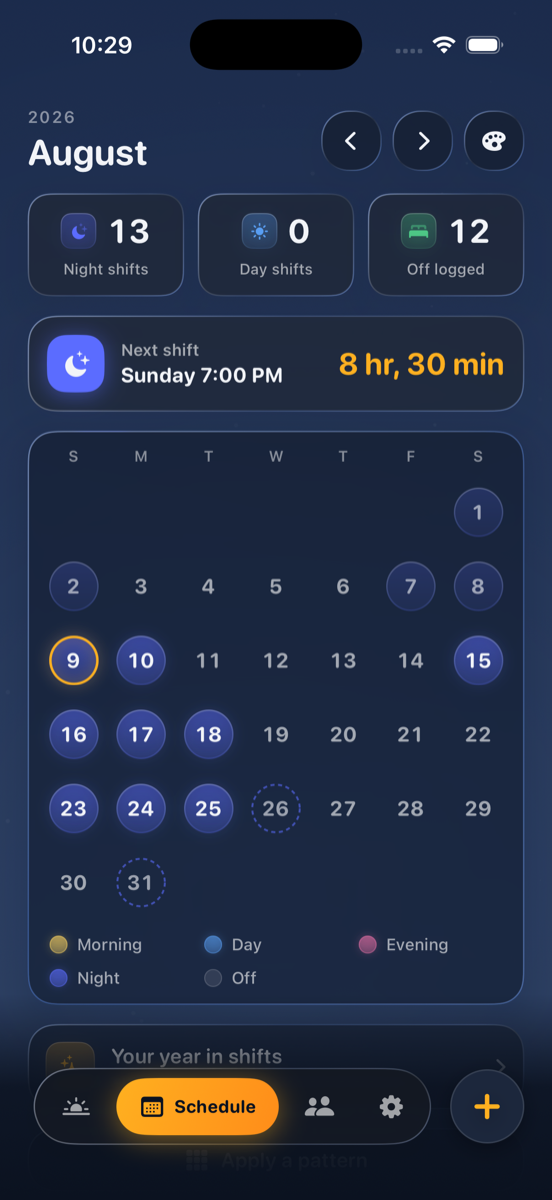
Every night you worked, in one grid
Owlshift keeps the whole history, not just this week. The deeper the amber, the more nights that month took. Hover a month to read it, or a year to see how the load stacked up.
- Nights, days and rest counted automatically from your rota
- Years of history so you can see the pattern, not just the week
- Public holidays folded in for your country
By the numbers
A plan you can watch working
Alertness held
Modelled alertness kept up through the 4 a.m. trough, instead of falling off a cliff.
Sleep debt cleared
Of the debt a rough rota builds up, paid back over about seven weeks on a plan.
Nights land on plan
Sleep that starts in its planned window across a rotating week, not left to guesswork.
Illustrative figures, from the circadian model.
Friends
Line up your days off with the people you work with
Share a short code and your rota shows up next to theirs. You choose what they can see, and it works between iPhone and Android.
- One code no phone numbers, no address book access
- You pick what's shared and can stop at any time
- Cross-platform iOS and Android see the same thing
Inside the app
Built to read at 4 a.m.
And the details
The small things that add up
Drive-safety warnings
A heads-up when your alertness is likely too low to drive home safely after a long or overnight shift.
Public holidays built in
Pick your country once and the holidays land in your rota, so a long weekend is planned for, not stumbled into.
Reads your measured sleep
Optional Apple Health and Health Connect sync: works with Apple Watch, Garmin, Xiaomi, Huawei and anything that writes there.
Quiet while you sleep
Reminders land when they matter and stay silent through your sleep window, so the app never wakes you.
Home screen widget
Your next step and the time until it, without unlocking the phone. Rolls over at midnight on its own.
Compare with friends
Share a short code to line up rest days with colleagues, across iPhone and Android.
21 languages
Your plan is written in the language you choose, not machine-translated on the fly.
Getting started
A plan in minutes, no wearable
Add your shifts
Type your rota, photograph the printed schedule, or import it from your calendar.
Answer the quiz
One short chronotype quiz tells Owlshift whether you lean early or late.
Get your plan
Every day opens on your body-clock dial: sleep, nap, light and caffeine timing.
Follow the nudges
Quiet reminders land when they matter, and stay silent while you sleep.
Feel the difference
Watch your alertness hold up through the shifts that used to flatten you.
From the journal
Worked schedules, not vague advice
- Start hereHow to Work Night Shifts and Stay Healthy10 min read
- Worked schedules12-Hour Night Shift Sleep Schedule Example8 min read
- Nursing rotasSleep Schedule for a Night Shift Nurse9 min read
- Short sleepOnly Sleeping 4 Hours After a Night Shift?8 min read
Before you download
The questions shift workers ask us most. Anything else, support is one tap away inside the app.